The Quest for Camera Access and Light Detection
Thought process and actual documentation on the design and development of my work.
Who’s this for?
Who? AR industry. Software Engineers, Artists. If you’re trying to learn, probably you.
How? I’ve found I learn the most when I can listen in on problem-solving discussions. This post is text, but hopefully capturing my discussions with myself while trying to solve the problem of making the prototype. Also, this is my first blog, I’m trying things out here.
Real quick, what does the prototype do again?
Snap a picture with a hand gesture to create interactive 3D objects.
If you snap a picture of an indoor light/lamp, the app will virtually relight your environment.
How I got the idea: Two Ooh, shiny moments. I saw these two amazing posts and pretty much immediately knew what I was making:
Takahiro Horikawa’s Image-To-Object Prototype: See here
Takashi Yoshinaga’s mind-blowing physical ← → virtual interaction AR prototypes: See here
Making the Thing
On the design side all I had to do was diagram out the code logic, because I already had Takahiro’s video to define the general UX. I knew what I was going to make. I had a few starting questions. These questions balloon pretty fast into a bunch of other questions so lets rip through them one topic at a time.
For convenience, here’s an overview:
Side Note: At the bottom are open questions/problems I have for future me. But if you have links or projects that answer those please let me know :)
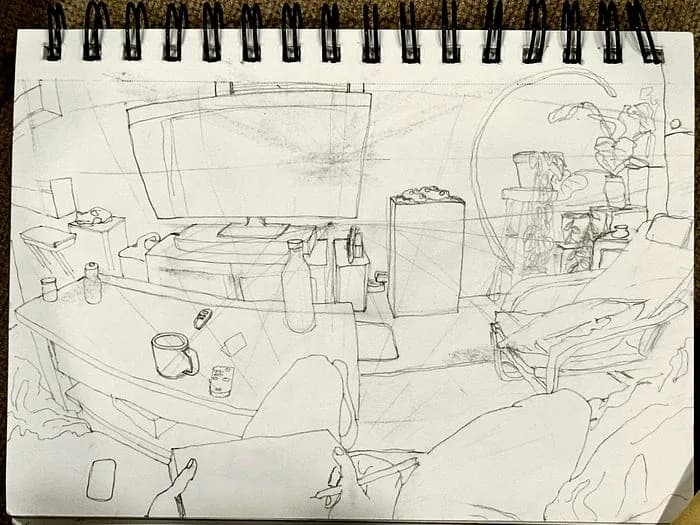
1. What am I making?
Because I already have video of Takahiro’s prototype, I pretty much had sketch of my prototype’s UX. But I didn’t have a sketch of how to structure my logic in Unity. So I drew it out while thinking it through. Under the diagram below, I chronologically list the questions and answers that went through my head (as accurately as I can remember!). Note, in a sketch *everything* is subject to change and in many cases the code is totally different. Again though, thought process is what I’m focusing on here.
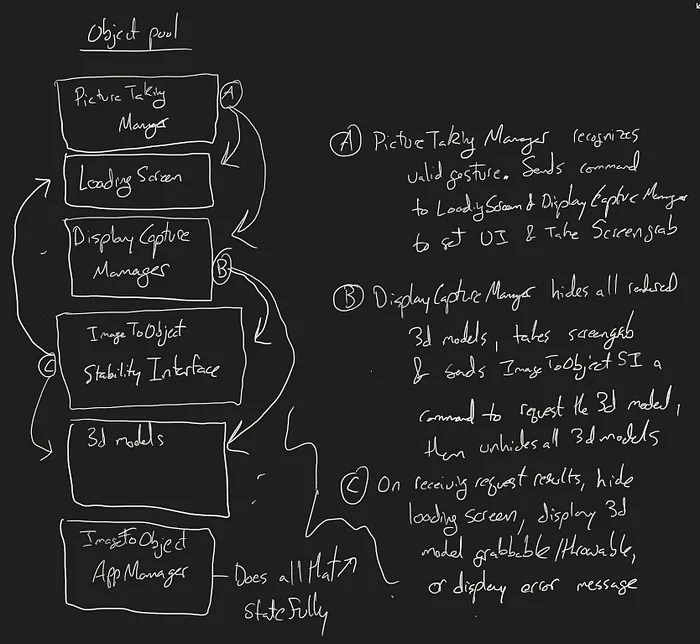
Questions and Answers:
What’re the basic requirements to make this work?
A way to recognize a picture-taking hand gesture, UI for loading screen/recording menu, something to wrap “Trev3D”’s DisplayCaptureManager passthrough workaround, something to handle interfacing with the Stability Image-To-3D api, something to handle 3D models, and probably something to manage the whole thing statefully and have the app structure written out in comments because I strive to never “read” code as documentation and refuse to follow chains of logic through disparate scripts.
Should I add support for people that prefer controllers?
No, like 15 people will be trying it anyway. I can’t put it on the quest store. Also, goal is to ramp back up on dev and design process, not try to sell an app.
Okay, do I want this to be event based?
Kinda? For now, figure out if it makes sense to use events over direct references case-by-case. App code will be in development for like a month or two, so err on the side of direct references. Also, I can rely on a couple patterns: Service Locator/dependency injection, and an obscenely useful state machine script — both of which do not allow me to code mindlessly.
How’s this work?
Should I avoid Monobehaviours? No lol what, I’m not even gonna approach performance issues with this prototype.
PictureTakingManager will recognize a valid hand gesture, and then surface that to the rest of the app. Only the DisplayCaptureManager and the LoadingScreen need to know about this, so how about just call a function on each to tell those what to do. Direct references.
DisplayCapture manager needs to get the screenshot of the camera and then send it to the ImageToObjectStabilityInterace. Actually, there might be 3d models being displayed. Turn all those off before grabbing a screenshot. This means the 3DModelManager will also need to keep track of all the 3D models made so far. Sick. Idk how it’s surfacing the screenshot data yet, handle references however it makes sense when I get there.
In ImageToObjectStabilityInterface, after receiving the 3D Model, unhide the previously created models. Instantiate the new 3D model. Add scripts to it at runtime? Nah just make a prefab with all the scripts on it as a wrapper object. Direct references.
Feels like that’s it, but just for safety I’ll have an ImageToObjectAppManager that serves 3 functions: Acts as the dependency injector where I need it, has a custom update/tick for all my objects, and handles app startup/running/quit statefully.
Alright sweet, how the hell do I get camera access now?
2. Camera Access, how? And other critical pieces.
Camera access was surprisingly easy to get started on, thank you Julian Triveri! M8 made a github project with the workaround and good documentation here.
Questions and Answers:
How do I record?
Camera access code surfaces frames as soon as the OS provides them. Cool, but if I use the Android API to switch to recording instead of just providing the camera screens, I’m error-ing out for some reason. Ahhhhh it’s because on the Android side — for some reason — we’re losing the reference to the screengrab frame.
Side Note: Passthrough API is now available, so I won’t go in depth here but I will make a note. If you’re like me, and have never gone to the depths in non-Unity land, then read up on the links in the rest of this paragraph. You’ll get useful mental landmarks in case you need them. Turns out Unity has a Java integration. You can make calls to Java code by using Unity’s API and ALSO(!!!) write Java code to interface w the Android OS within your Unity project. P sweet exercise in interfacing w a new language and the Android OS.
Do I feel like figuring this out?
If I have to yeah, but I did see a prototype by the devs at mixed.world where I could switch between recording and display-only using a genuinely esoteric, but repeatable, set of button presses. I just figured out the order and called those functions in my own app. Goal is prototype, not learning how the Android ImageReader stuff works.
Okay sweet, how do I load the models?
Stability’s api spits out .glb files. GLTF is a new standard 3d object file format, and that’s why you have to download a package/library to load them. Hnnnnnng. Alright. Just run thru docs, load a .glb file. Why isn’t the shader working? Error log effectively says the shader is missing. How? I just downloaded this package, it’s the CURRENT version in production. Ahhhh there we go, because I’m using URP. Okay write a custom shader, I’m not dealing with this in the future. Works now.
Note: OpenAI api for light detection works the same (web request). Don’t particularly think it’s interesting here, but may as well be thorough and mention what I used for the indoor, artificial light detection feature.
I think UI is the last piece? How does Quest 3 UI development work now?
Initially I started with FloatGrids. At some point in 2023(? maybe ‘22?), I saw the first-published design system attempt by the awesome people at FloatGrids. Unity-side prefabs, Figma-side source files, everything we’ve all dreamed of in AR UI development after MRTK was gone. But then, idk what’s Meta up to nowadays? A whole UI Set integrated into the samples of their own sdks, you say? Alright, easy choice, it’s using Unity UI and has a few usability tools. I’ll accept the possibility of jank, and commit to using that.
Ah, UI was not the last piece. How do I access your physical environment data?
This is the actual last critical piece, though thankfully was straightforward enough. I’ll note tho that you’re gonna want to incorporate *some* form of environmental lighting if you want to get closer to Apple Vision Pro level of immersion. Mixed.world devs, thank you for porting the MRTK/Microsoft stuff and providing it on github!!
That’s all for prototype-specific research! But since the “what’s Meta upto nowadays?” question yielded an awesome result I figured I should follow up on side questions I have.
3. How far along is WebXR? And other side questions I have.
I had a few notes in the brainium that I wanted to explore before making the Thing. WebXR, WebGPU, on-device AI models in Unity, current state of off-the-shelf models.
WebXR is sweet because you can access Augmented Reality from virtually any device now, without downloading an app. Can I use it now? Short answer, yes but not worth doing it for this project.
WebGPU is out for Unity in preview, is supported by many browsers. But ultimately, not worth my focus right now.
On-device AI models in Unity are supported now! Actually super super super interesting, next prototype I make will include this in some way.
Current state of Off-The-Shelf AI models: clearly AI is useful in many things however in my Opinion, AI has been worthless as a workflow tool for programming, 2d art, 3d art, 3d animation, any form of design, and writing up until like 2–3 months ago as of time of writing (March 2025). I spent good time running through models/tools like Claude, Windsurf, ChatGPT, etc with 1 question in mind per “field” of work I was exploring:
Have I learned enough about this field to be able to understand my own intent and reject anything unaligned with that intent?
Some topics explored: variation generation in character concept art, environment concept art, voice-over system as placeholders to test dialogue-system in games, lifting/calisthenics/etc, injury (lifting injury) recovery, leetcode prep cause it’s interview season, review/suggestions on my creative writing project. The answer to all of these explorations is actually somewhat exciting.
Where I can answer a “yes” to the question, I found I could use AI to help me out in variation generation in most cases. Extremely exciting.
Where I can answer “no” to the question, unequivocally it’s a garbage idea to use AI. Intentional action, aside from being sexy as a way to live life, is essential to making and creativity. If you have no intent, why’re you trying to make something? If money is the answer then that’s fair, everyone wants financial security. However if you find problem-solving, money, or artistic intent aren’t your answer, look inward. Go to a rave, read a book. Idk, live a little first before trying to expand the collective consciousness!
Jumping from the side-questions to the final prototype may seem like a “draw the rest of the owl” type thing. But I aim to inspire and share knowledge. I won’t do teachers the disrespect of pretending I can teach, it’s something that takes a long time to truly do correctly. The teachers you’ll find online are way better equipped than I am to teach. And if you’re lucky enough to find mentors IRL, even better.
Anyway, I made the rest of the owl and now I’m writing this and tomorrow I’ll start on a new prototype or exploration! No need to imagine, Sisyphus is happy.
4. Open Problems/Questions.
Followups on all the the Side Questions from section 2.
What’s going on with OpenXR? Can I deploy to any headset yet? Is that even worth manufacturers’ time yet? Last time I checked, at least, Meta/Apple/Microsoft and the Khronos Group were making a lot of headway.
Remote rendering? Remote compute in general? Local web server, pay for servers? I have an old laptop with a broken screen but a working GTX 1060. Probably will explore this a bit.
Devices: Logitech MX Ink Pen (hehehe nabbed one on SIGHT, is the coolest new device period). Meta’s got EMG wrist bands for hand tracking. Snap’s Spectacles look surprisingly capable, but it’s a dev device? Like with the Apple Vision Pro, I’ll wait for some kind of release device instead of developer toolkits for now. Also got the Neurosity EEG device a while ago, I wanna play w that way more now that I’m caught up dev-side on Quest 3. Valve’s Deckard headset is happening at some point I think? What about the high end, I’ve been on AR hardware so long now I haven’t even touched high end VR in a while. I can stream of consciousness more but you get the picture. Hardware.
Software: What’s SoTA in guassian splats? Niantic’s Scaniverse is out now. VRChat continues to absolutely wreck everyone else in terms of users. Seems like they’re ramping up hiring slowly and surely, which is really encouraging to see! How does Meta Horizon/Rec Room compare now? Unreal engine, Godot, native development how?
Hope this was enjoyable! Have a nice day!
Why am I writing this?
I’m writing to provide what I wish I had while learning — real thought process on design and engineering, opinions on tradeoffs, and acknowledging how often I’m wrong.
I believe everyone can learn anything, and the more breadth you get the more you’re able to solve problems. Depth is easy to access (still challenging to gain) today, Youtube University is available to almost everyone. I hope to convince you over time, not just with this post. If you leave here clicking only one link, learn basic design thinking. If you’re an engineer I encourage you to learn fine art. If you’re an artist, I encourage you to believe you can learn to structure logic (programming) and describe the world objectively (math), and then go for it. Find joy and beauty in all of this. If you look for it, you will find it.
If you’d like to check out more of my work, visit my website at https://sidnaik.io/
or any of my socials @SidsCreativeTech :)
Originally published on Substack.